Hinata
Hinata is an open-source project and issue tracker that runs on your own server. One published app connects to your server and picks up your organization's name and logo at runtime.
- License: GPL-3.0
- Current version: 10.4.0
- No limits on users, teams or boards
Two ways in
New here? The Quick start gets a stack running in three commands. For real use, head to Self-hosting.
What is Hinata?
Everything for agile project management: projects and teams, issues with a hierarchy (Epic → Story → Sub-task), boards, sprints, a Gantt timeline, time tracking, reports and a Confluence-style knowledge base. It runs for one team on one server, or behind a reverse proxy for a whole organization.
What sets Hinata apart from most self-hosted trackers:
- A real app for every platform. One Flutter codebase for six platforms, with live changes over Server-Sent Events, offline-friendly navigation and a ⌘K command palette.
- Your own server. The app has no built-in backend. You add one or more servers and switch between them. Branding comes from your server at runtime. Or you publish your own client with your own package id, name, icons and accent color.
Design language
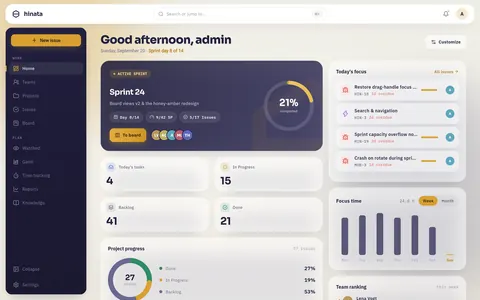
A navy navigation rail, a warm paper workspace and a honey amber accent (#D9A032) that looks the same in light and dark. Liquid glass appears on the mobile navigation, the ⌘K palette and the attachment lightbox.
Who it's for
- Self-hosters and privacy-first teams: data on your own hardware, a copyleft license, no per-seat pricing.
- Agencies and product studios: a tracker under your own brand for your own clients.
- Operators and platform teams: MongoDB replica sets, S3 object storage, SMTP, SSO, rate limiting and an audited security model.
- Developers: a well-documented codebase (Spring Boot 4 + Flutter) to read, extend and contribute to.
The two repositories
| Repository | What it is | Stack |
|---|---|---|
| hinata-server | Backend API, business logic and data layer. Publishes a Docker image to GHCR. | Spring Boot 4, Java 21, MongoDB (replica set), S3/MinIO, SMTP |
| hinata-app | The client for every platform, from one codebase. | Flutter, bloc/cubit, go_router, dio, i18next (en + de), fl_chart |
The app talks to the server over a versioned REST API at /api/v1. More in Architecture.
Platforms
One Flutter codebase, six targets. Details live on The apps.
- Android: phones and tablets, App Links for
https://track.example.com. - iOS: iPhone and iPad, Universal Links via Associated Domains.
- Web: a full Flutter web build, served by the web container.
- macOS: a native desktop app.
- Windows: a native desktop app, packaged as MSIX for the Microsoft Store, with push over Windows Push Notification Services (WNS).
- Linux: a native GTK 3 desktop app (application id
com.ahmadre.hinata), installed withsnap install hinatafrom the Snap Store as a strictly confined snap for amd64 and arm64. Flatpak and AppImage recipes are in the repository. The apps explains the two permissions snap asks you to connect. Ahinata://link (SSO callback, invite, password reset) reaches the open window, because the app registers the scheme handler and runs as a single instance.
What Linux does differently
There is no desktop push service. Notifications arrive in the app and by e-mail instead of as system banners. Your notification settings still govern your phone.
There is no webcam capture, so the composer doesn't offer "take a photo". Attaching a photo or any other file you already have works as usual.
Staying signed in needs a keyring (GNOME Keyring, KWallet or anything that speaks the Secret Service). Without one, the app tells you, and the session ends when you close the window.
What's inside
Each area has its own page:
- Projects & teams: per-project workflows and issue keys (like
ASTA-42), reusable colored labels, and teams whose per-member project access decides what each person sees. - Issues & hierarchy: types, priorities, tags, comments, attachments, dependencies and three levels like in Jira: Epic → Story/Task/Bug/Feature → Sub-task.
- Boards & sprints: columns mapped to workflow states, WIP limits, a backlog, a Board / Backlog / Timeline switcher and sprint planning with burndown.
- Gantt & time tracking: a timeline with start and due dates and dependencies, work items with activity types and weekly timesheets.
- Reports & dashboard: burndown, velocity, cycle time, distributions and created vs. resolved, exportable to PDF, plus a focus dashboard.
- Knowledge base: hierarchical Markdown articles, global or per project, with smart links to real issues and people.
- Notifications: in the app, by e-mail and as push through the Hinata Connect gateway.
- Search & palette: a ⌘K liquid glass command palette with triggers, recents and a responsive sheet.
- Git integration: connect GitHub, GitLab or Bitbucket for development info, smart commits and workflow automation.
- Single sign-on: OpenID Connect, OAuth 2.0, SAML 2.0 and LDAP, configured at runtime with no restart.
The full walkthrough is in the Feature tour.
Why self-host Hinata
- Your data. You own the server, the data and the brand. Everything lives in your MongoDB and your S3 bucket. Attachments use randomized object keys and presigned downloads.
- Open, no paywall. GPL-3.0, no seat limits, no paywalled features. Everything from SSO to push works without handing your data to a third party.
- No Firebase required. Push and universal links are relayed through the Hinata Connect gateway. One published app can serve many servers, and you need no Firebase project of your own.
- Runtime configuration. SSO, e-mail ingest, push and Git OAuth apps are stored in MongoDB and managed in the Admin area. The database overrides the environment, and changes apply without a restart.
- Security. Stateless JWT (HS512), BCrypt password hashing, database-backed login blocking, per-IP rate limiting and hardened HTTP headers, mapped to the OWASP Top 10. See the Security model.
Get started
Two paths, depending on what you need next:
- Get started → A running server and app in three commands with Docker Compose.
- Self-host it → The production path: deployment, configuration, database, storage, mail and reverse proxy.
Want to understand how it fits together first?
Architecture shows the data flow. Core concepts explains the vocabulary: organizations, projects, issues, sprints, teams and more.