Issues & hierarchy#
The issue is the atom of work in Hinata. Everything you plan, assign, discuss and ship is an issue: an epic that spans a quarter, a story in this sprint, a bug someone just filed, or a sub-task on a checklist. This page covers what an issue holds, how issues nest into a hierarchy, and how they link into your Git history.
Where issues live
Every issue belongs to exactly one project and carries that project's key as a prefix — ASTA-42, WEB-7. The number is assigned once and never reused, so a key is a stable, human-friendly identifier you can paste into a chat, a commit message or a browser.
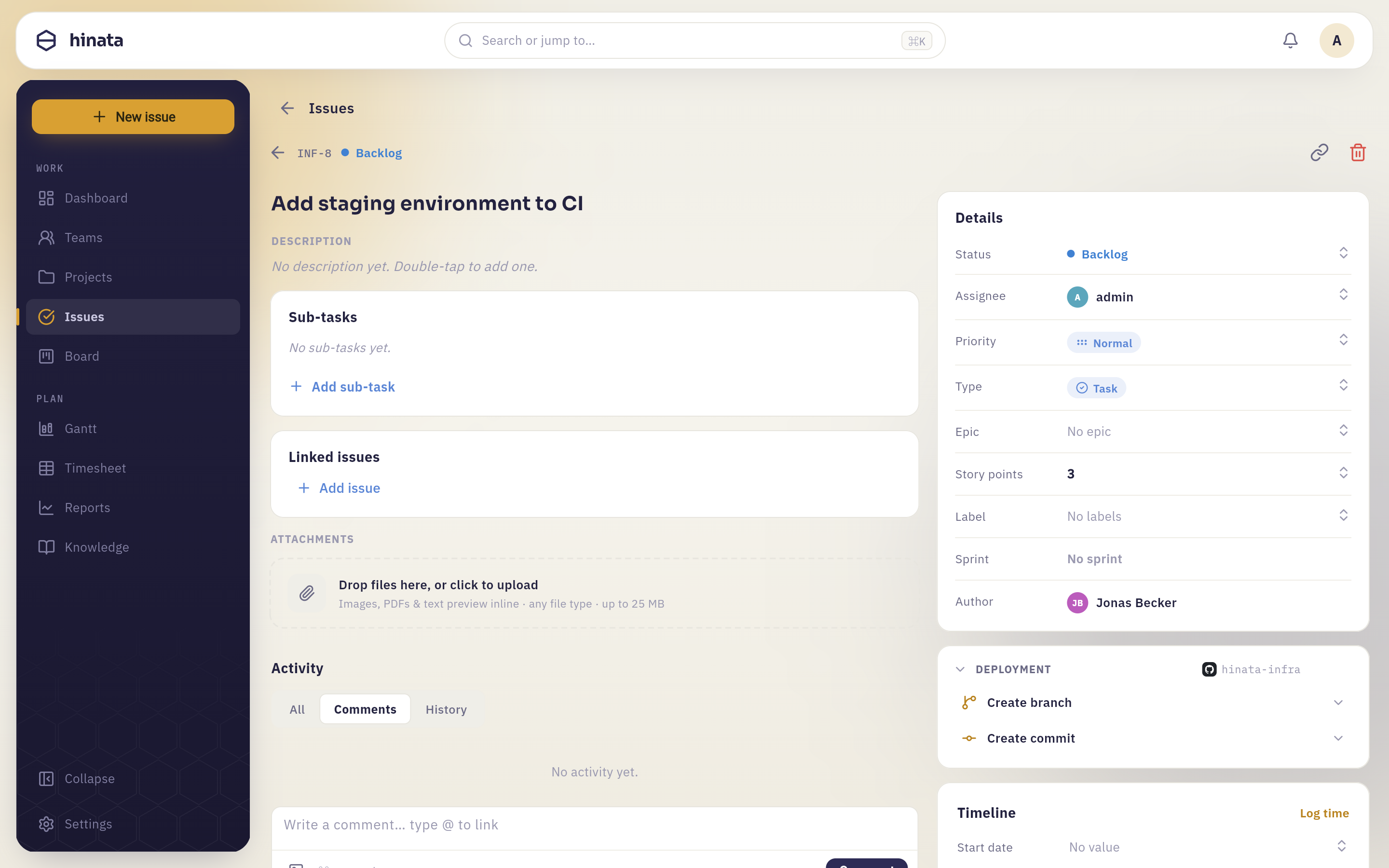 The issue detail — description, sub-tasks, links, attachments, details and Git activity.
Anatomy of an issue#
Open any issue to see the full detail view. An issue holds:
- Type — one of Epic, Story, Task, Bug, Feature or Sub-task. The type sets the icon and colour and decides where the issue can sit in the hierarchy (see below).
- Title & description — the description is full Markdown, edited with a shared toolbar (headings, lists, code, links). Smart links resolve real issues and people as you type.
- Priority — a graded scale from lowest to highest so the team knows what to pull first.
- Assignee & reporter — who's doing the work and who raised it.
- Labels — reusable, colored project labels for slicing and filtering (e.g.
frontend,needs-design). - Story points — an estimate used for sprint capacity and the velocity report.
- Dates — a start and due date that also drive the Gantt timeline.
- Workflow state — the column the issue sits in on the board, drawn from the project's own set of states.
- Comments — a flat, threaded discussion with per-comment reply threads, reactions and voice notes (see below).
- Attachments — files and images (see below).
- Dependencies & links — relationships to other issues.
Types at a glance#
| Type | Typical use | Hierarchy role |
|---|---|---|
| Epic | A large body of work spanning many sprints | Top level — parents stories, tasks, bugs, features |
| Story | A user-facing slice of value | Mid level — can have sub-tasks |
| Task | A unit of work that isn't user-facing | Mid level — can have sub-tasks |
| Bug | A defect to fix | Mid level — can have sub-tasks |
| Feature | A capability to build | Mid level — can have sub-tasks |
| Sub-task | A small step inside a story/task/bug/feature | Leaf level |
Descriptions & comments#
The description and every comment support Markdown with a shared editor toolbar, so you get headings, checklists, code blocks and links without memorizing syntax. As you type, @mentions notify a teammate directly, and smart links separately recognize issue keys and turn them into live reference pills — mention ASTA-42 and it resolves (and stays highlighted) even if the title changes later. This is the same smart-link engine the knowledge base uses.
Keep discussion on the issue
Comments live with the work, not in a separate chat. When a decision is made in a comment, it stays attached to the issue forever — future you (and everyone who inherits the ticket) will thank you.
Comments are laid out flat and left-aligned, Jira-style, rather than as chat bubbles — easier to scan on a long-running issue. Each root comment can carry its own reply thread, loaded lazily only when you open it, so a busy issue doesn't have to fetch every reply up front. Sort the thread newest first or oldest first, and jump straight to any comment via its permalink.
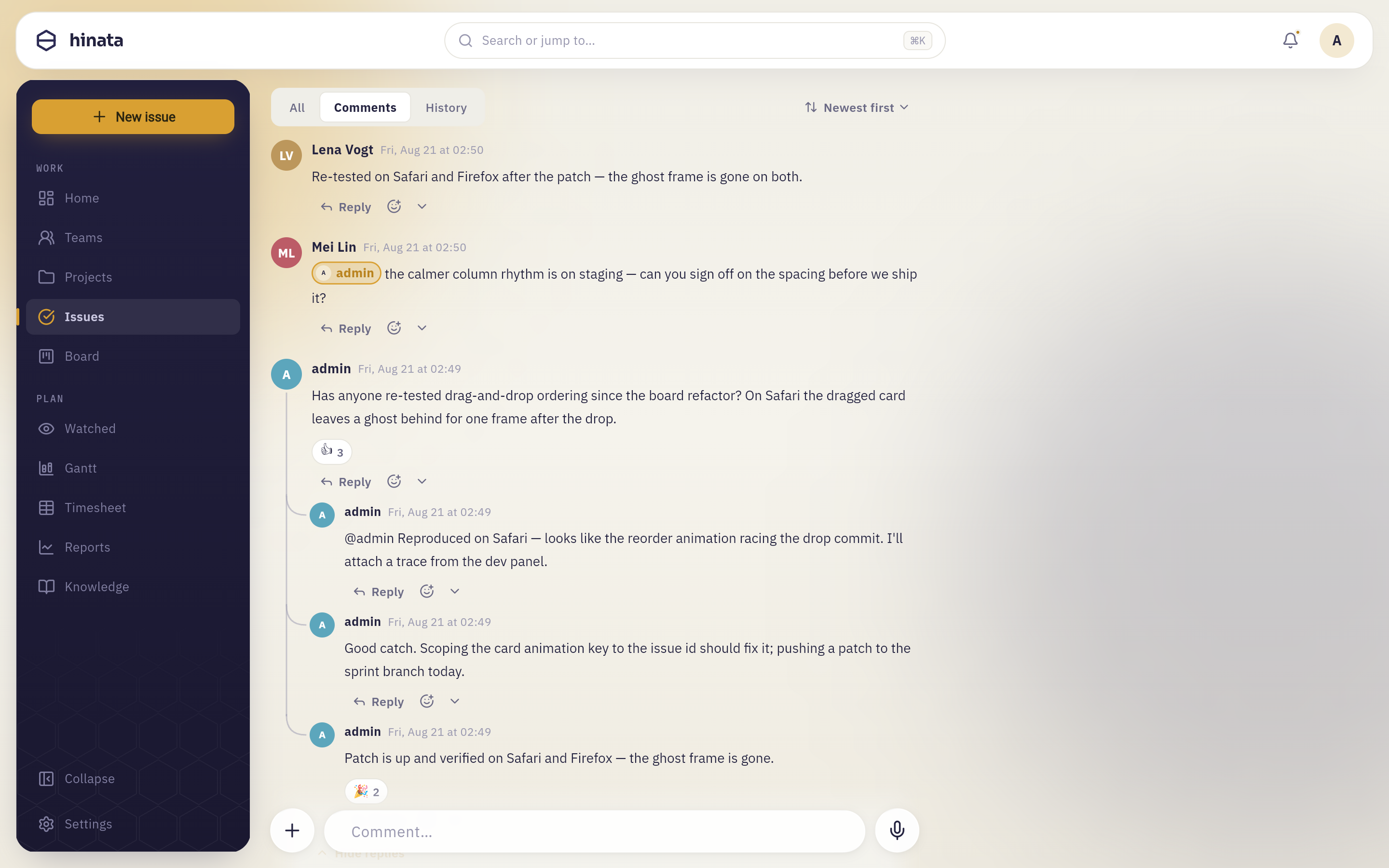
- Reactions — react to a comment with an emoji, WhatsApp-style; you get one reaction per comment, and picking a new one swaps the old.
- Voice comments — record a short voice note straight from the composer. It's uploaded to your S3/MinIO bucket and plays back inline as a waveform bubble, alongside text comments in the same thread.
- Context menu — long-press (or hover, on desktop) any comment for reply, copy, copy link (a deep link that scrolls to and flashes that exact comment), pin, edit, delete, and multi-select for batch deletion of your own comments.
- Live updates — new comments, edits, reactions and deletes stream over Server-Sent Events, so everyone watching an issue sees the discussion update in real time without a refresh.
Attachments#
Drop files straight onto an issue. Attachments are stored in your own S3/MinIO bucket with randomized object keys and served through short-lived presigned URLs, so nothing is public by accident.
- Drag & drop a file onto the attachments grid, or use the upload button to pick from your device.
- Images open in a liquid-glass lightbox for a full-size look.
- Changes stream live over Server-Sent Events — when a teammate adds or removes a file, your view updates without a refresh.
- Size and type limits are set by the operator via environment variables. See Object storage for the admin side.
Dependencies & links#
Issues rarely stand alone. Link them to express relationships — for example that one issue blocks or relates to another. Dependencies feed the Gantt timeline, where a blocking link is drawn as a connector between bars, making it obvious what has to finish before something else can start.
The three-level hierarchy#
Hinata organizes work into a Jira-style three-level hierarchy:
Epic
└─ Story / Task / Bug / Feature
   └─ Sub-task
- An Epic is the top of a tree and groups the stories, tasks, bugs and features that deliver it.
- A Story, Task, Bug or Feature sits in the middle and can be attached to an epic and broken into sub-tasks.
- A Sub-task is a leaf — the smallest step, always under a parent work item.
You navigate and build this structure right on the issue:
- Breadcrumb — every issue shows its ancestry at the top (epic › story › sub-task), so you always know where you are and can jump up a level in one click.
- Parent picker — set or change an issue's parent (for example, attach a story to an epic) from a searchable picker.
- Child panel — on an epic, a panel lists its child work items and lets you add more.
- Sub-task panel — on a story/task/bug/feature, a panel lists its sub-tasks and lets you add them inline.
Archiving vs. deleting#
Most of the time you don't want to permanently delete an issue — you want it out of the way. Archiving is a soft delete: any project member can archive an issue (and its sub-tasks cascade with it), and it disappears from search, the board and sprints by default, but it isn't gone — it can be unarchived just as easily.
Hard deletion is destructive and role-gated: only a platform admin, the project lead or a team admin can permanently delete an issue. Hinata's UI checks your permissions on the issue and only offers the option you're actually allowed to use.
Hard-deleting cannot be undone — and what it takes with it depends on the type
Permanently deleting a standard issue (story, task, bug, feature) cascades: its sub-tasks, along with their comments, work logs and links, are removed with it — a sub-task cannot exist without its parent.
Deleting an epic does not. Its children survive as ordinary top-level issues and lose only the epic link, because a story is a real piece of work in its own right.
Either way there is no undo, so archive first if you're not certain, and reserve hard delete for cleanup that genuinely shouldn't exist anymore.
The hierarchy also powers the board: you can group the agile board into swimlanes by epic or sub-task, and filter the whole board down to a single epic.
Issues and Git#
An issue key is the bridge to your code. Once a project is connected to a repository, Hinata links branches, commits and pull requests to issues by their key:
- A branch whose name contains
ASTA-42links to that issue. - A commit whose message references
ASTA-42links to it — and only then; a commit is never linked just because it rides on an issue's branch. - A pull/merge request links by its title or source branch.
The linked development info — branches, commits, PR/MRs and build status — appears on the issue, so you can see the state of the code without leaving the ticket.
Smart commits#
You can also act on an issue straight from a commit message using trailers:
ASTA-42 #comment Fixed the race in the uploader
ASTA-42 #time 2h 30m
ASTA-42 #done
#comment <text>adds a comment to the issue.#time 2h 30mlogs work against the issue.- Any other
#wordtransitions the issue to a matching workflow state.
Smart-commit side effects are applied exactly once, even though providers redeliver webhooks. For the full picture — provider setup, automation rules and webhooks — see Git integration.
Related pages#
- Projects & teams — where issues, keys, labels and workflow states are defined.
- Boards & sprints — move issues through your workflow and into sprints.
- Gantt & time tracking — dates, dependencies and logging work.
- Git integration — connect a repo and use smart commits.