Feature tour
Hinata brings agile project management into one place: plan work, run sprints, track time and write documentation. It all runs on a single self-hosted server with a cross-platform app. Each area below gets a short overview and a link to its detailed guide.
New to Hinata?
To get a stack running, start with the Quick start. The vocabulary (organizations, projects, issues, sprints, teams) is explained in Core concepts.
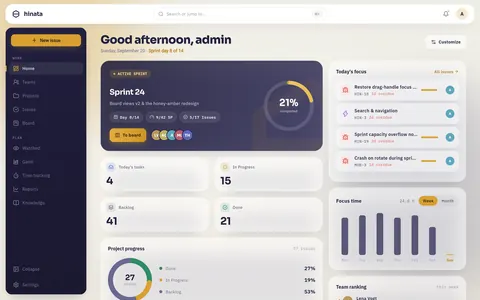
The feature map
| Area | What it does | Guide |
|---|---|---|
| Dashboard & reports | Focus for today, completion and team ranking. Plus burndown, velocity, cycle time and distribution charts you can export to PDF. | Reports & dashboard |
| Projects & teams | Projects with their own keys (ASTA-42), workflows and colored labels. Teams grant members access to projects and decide what each person can see. | Projects & teams |
| Issues & hierarchy | Types, priorities, labels, Markdown, comments, attachments and dependencies in an Epic → Story → Sub-task hierarchy. | Issues & hierarchy |
| Boards & sprints | An agile board with columns per workflow state, WIP limits, swimlanes and a backlog. Plan, start and complete sprints with capacity and burndown. | Boards & sprints |
| Gantt & time tracking | A timeline of start and due dates and dependencies. Plus work logging with activity types and weekly timesheets. | Gantt & time tracking |
| Knowledge base | Confluence-style hierarchical Markdown articles, global or per project, with smart links to real issues and people. | Knowledge base |
| Notifications | In-app, e-mail and push through the Hinata Connect gateway. No Firebase project of your own required. | Notifications |
| Search & palette | A liquid-glass command palette (⌘K) to jump anywhere, run commands and reopen recent items. A sheet on mobile. | Search & palette |
| Languages | Nine complete translations: English, German, French, Spanish, Russian, Chinese, Japanese, Hindi and Arabic. Right-to-left layout throughout for Arabic. | Languages |
| Git integration | Connect projects to GitHub, GitLab or Bitbucket for development info, smart commits and automation driven by signed webhooks. | Git integration |
| Single sign-on | OpenID Connect, OAuth 2.0, SAML 2.0 and LDAP, configured at runtime in the Admin area with no restart. | SSO |
Dashboard & reports
The dashboard is where each person lands. It shows today's focus, completion, a weekly tracker and a team ranking.
On top of that come reports: burndown and velocity for sprints, cycle time, created vs. resolved, and distributions by state, priority or assignee. Every report exports to PDF, for example for a sprint review. Read more in Reports & dashboard.
Projects & teams
Everything in Hinata lives inside a project. A project has a short key (like ASTA) that prefixes every issue number (ASTA-42), its own workflow states and reusable colored labels.
Teams control who sees what. A team grants its members access to specific projects. A person only sees the projects a team grants them, anywhere in the app. See Projects & teams.
Issues & hierarchy
Each issue has a type (Epic, Story, Task, Bug, Feature or Sub-task), a priority, labels, a Markdown description, comments, attachments and dependencies.
Issues nest in three levels like in Jira: Epic → Story/Task/Bug/Feature → Sub-task. On the issue you get a breadcrumb, a parent picker, and child and sub-task panels. Attachments stream in live over Server-Sent Events, and issue keys link into your Git history. See Issues & hierarchy.
Boards & sprints
The board shows a project's issues in columns by workflow state, with drag and drop. WIP limits and swimlanes (by epic, assignee or sub-task) are optional.
- The Board / Backlog / Timeline switcher shows the same work three ways.
- The backlog holds everything not yet in a sprint.
- Sprints run plan → start → complete with capacity and story points, and feed the burndown report.
See Boards & sprints.
Gantt & time tracking
The Gantt timeline is a read model over your issues' start and due dates, dependencies and progress. It shows the shape of a delivery and where the critical path runs.
Time tracking lets people log work against issues with activity types. It rolls up into weekly timesheets for reporting and capacity planning. See Gantt & time tracking.
Knowledge base
The knowledge base is a Confluence-style space for documentation. It holds hierarchical Markdown articles, global or scoped to a project, with the same team and project access control as the rest of the app. Smart links resolve issues and people as you type, so docs stay current. See Knowledge base.
Notifications
Hinata notifies in the app, by e-mail (over your SMTP relay) and by push on Android, iOS, macOS and Windows.
- Push is relayed through the Hinata Connect gateway. A single published app can serve many servers, and self-hosters don't need a Firebase project of their own.
- Linux has no desktop push service to register with. A Linux client gets the same news in the app and by e-mail. The account's push preference still applies to that person's phone.
Each person picks what they receive from a notification matrix in account settings. See Notifications.
Search & palette
Press ⌘K (or Ctrl+K) anywhere to open the liquid-glass command palette. It searches projects, issues, people and articles, shows recent items and offers quick commands. On a phone it opens as a sheet. See Search & palette.
Languages
Hinata comes in nine languages. Each one is fully translated.
| Language | In its own words | Code | |
|---|---|---|---|
| 🇬🇧 | English | English (UK) | en |
| 🇩🇪 | German | Deutsch | de |
| 🇫🇷 | French | Français | fr |
| 🇪🇸 | Spanish | Español | es |
| 🇷🇺 | Russian | Русский | ru |
| 🇨🇳 | Chinese (Simplified) | 简体中文 | zh |
| 🇯🇵 | Japanese | 日本語 | ja |
| 🇮🇳 | Hindi | हिन्दी | hi |
| 🇸🇦 | Arabic | العربية | ar |
Pick yours under Appearance & app in your account. The interface switches at once. The server also writes its e-mails and error messages in that language.
Arabic reads right to left, and so does the app when you choose it: menus, lists, navigation and the arrows on buttons.
About the flags
The flags are only there for quick scanning. A flag stands for a country. Spanish is spoken beyond Spain, and Arabic in more than twenty countries.
Git integration
Connect a project to one or more repositories on GitHub, GitLab or Bitbucket. Hinata runs a real OAuth flow and registers a signed webhook. Push, pull request and CI events become development info on the issue: branches, commits, PR/MRs and build status.
On top of that you get smart commits (ASTA-42 #comment shipped, #time 2h) and automation that moves issues forward as work progresses. See Git integration.
Single sign-on
Bring your own identity provider. Hinata supports OpenID Connect, OAuth 2.0, SAML 2.0 and LDAP, for example with Keycloak, Authentik, Azure AD, Google, Synology SSO and more. Everything is configured at runtime in the Admin area, with no restart. See SSO.
Where to go next
- Projects & teams: set up your first project and control who sees it.
- Issues & hierarchy: the work item, end to end.
- Boards & sprints: run an agile sprint from planning to review.
- Core concepts: the key vocabulary.