Report and block
Every server has its own moderation, run by your organization. When something breaks the house rules, report it. When someone becomes too much for you, block them. Neither tells the other person who you are.
Report something
Every issue, comment, voice message, file and knowledge base page has Report … in its ⋯ menu, and so does every person's profile. The file viewer has it too.
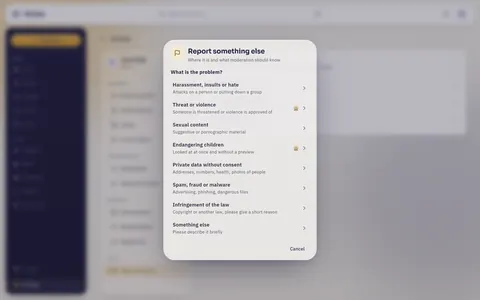
- Choose what the problem is: harassment, insults or hate; threat or violence; sexual content; endangering children; private data without consent; spam, fraud or malware; infringement of the law; or something else.
- Add what moderation should know. For endangering children, an infringement of the law and something else, a short description is required.
- Send it with Report. By sending you confirm that your details are true to the best of your knowledge.
When you report a comment or a person, Also block … blocks them in the same step. A comment you reported folds away for you.
For something without a menu of its own, such as the name of a project, a board or a team, use Settings › Help and contact › Report something else …. Say where it is and what moderation should know.
What happens then
- A person in moderation looks at it, usually within 24 hours. Reports of threats and of danger to children come first.
- The person you reported never learns who reported. Inside moderation, who reported stays covered too: uncovering it takes a reason, and the reason goes into the case's history. Who reported something about children stays covered always.
- Nobody in moderation decides on a report they are part of, neither on their own content nor on something they reported themselves.
- Once moderation has decided, you get a notification, Your report was looked at, with what came of it.
You can send up to 20 reports an hour and 100 a day, of which up to 5 a day about threats or children. A report you know to be false breaks the house rules itself.
People without an account can report too. The house rules of your server name the form for that.
Block someone
Block person in the menu of a comment, or Privacy › Block on a profile. Nothing the person sets off reaches you any more, their comments and voice messages fold away, and they can no longer add you to issues. Your work together stays. They are not told, and neither is moderation. Comments & attachments explains in full what changes and what stays.
Settings › Blocked people lists everybody you blocked, each with Unblock.
Blocking only protects you. If something should go, report it.
A notice from moderation
When moderation removes something of yours or suspends your account, you get a notice from moderation, in the app and by email, whatever your notification settings say. It tells you:
- what was removed, or how long your account is suspended,
- how it came up: after a report, on moderation's own initiative or through the automatic text check,
- what moderation found, and the house rule or the law it is based on,
- whether automated means were involved,
- until when you can appeal, and that you can go to court independently of that.
In the place of what was removed you see Removed by moderation. Why? opens the notice.
A suspended account is signed out everywhere and its access tokens stop working. What you wrote stays as it is. A suspension of 7 or 30 days ends by itself, an indefinite one when moderation lifts it.
Appeal
You can appeal a decision once, within six months: Appeal … in the notice. Say what moderation got wrong and what it should know. Somebody else in moderation, never the person who decided, looks at it again.
While your account is suspended you cannot sign in. Then reply to the email with the notice. Your reply counts as an appeal.
The notice shows the outcome. Either the decision stands, or it is reversed: the content comes back and a suspension ends. If the content was written anew in the meantime, the new text stays.
House rules
Your organization's house rules say what is not allowed and how moderation works. You agree to them after signing in, and again when your organization asks everybody to agree to a new version. Settings › Help and contact › House rules shows them in full, with the version you agreed to and when.
Your server may check texts when they are saved and refuse clear violations. Your account explains what you see then.