Moderation
This page is for the people who moderate a Hinata server. Moderation reviews what members report, decides on it and tells everybody involved why. It is run by your organization, never by the provider of the app.
The role
An administrator hands out the moderation role in Admin area › Users, in the person's panel. Nobody can give it to themselves, the last person with the role stays, and every change is in the audit log. Two moderators or more are better, so that nobody has to decide on a report about themselves.
Moderators:
- see what was reported, with no more context than the decision needs,
- see neither the admin area nor projects they are not a member of,
- get a notification for every new case. Urgent cases say so. Under Settings › Notifications the group Moderation comes by email and as a push from the start.
You find the work under Settings › Moderation.
The case list
Reports on the same content form one case. The list has three views:
- Open: what waits for a decision, urgent first, then the oldest. Urgent are reports of threats and of danger to children.
- Appeals: decisions somebody appealed against.
- Done: decided cases, until their retention ends.
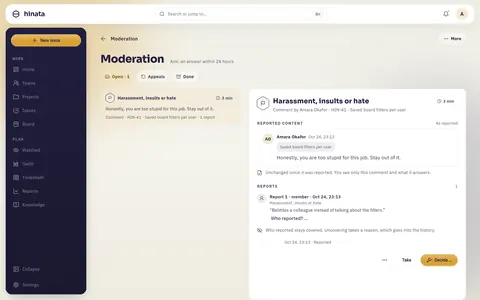
Every row shows what was reported, by whom it was written, how long it has been waiting and how many reports it has, and where they came from: from a member, from somebody without an account, from the automatic text check, or on moderation's own initiative. With you marks the cases you took. Reported pictures and texts stay covered in the list.
The aim is an answer within 24 hours. After 20 hours the moderators get a reminder. After 24 hours a case counts as overdue, and the administrators who have nothing to do with it get a notice too.
On a wide screen the list and the open case stand side by side.
A case
Take makes the case yours, so that two people do not work on it at once. Give back returns it. When somebody has held a case for two hours without deciding, anybody else can Take over.
The case shows:
- Reported content, as it was when it was reported, and whether it is unchanged, changed or deleted since. A line says how much you see, for example only this comment and what it answers.
- Files. A file reported as sexual content opens only after a warning, only in the case, is not saved, and the viewing is logged. A file reported as endangering children is never shown by Hinata.
- Reports, each with its reason and its text. Who reported stays covered. Who reported? … uncovers it, with a reason that goes into the history. Who reported something about children stays covered always. When the same source has sent manifestly unfounded reports about children before, the case says so.
- Withheld content. A report from somebody without an account that names internal content stays closed until a second person opens it: one asks with Ask to open …, another opens with Open …, both with a reason.
- Other uses: where a removed picture also appeared. Look at those places as well.
- History: every step, with who took it and why.
Deciding
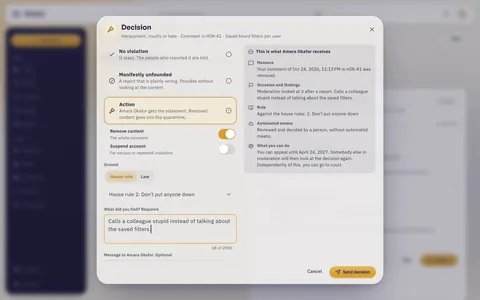
Decide … opens the decision. Choose the outcome:
- No violation: the content stays. The people who reported it are told.
- Manifestly unfounded: a report that is plainly wrong. You can decide this without looking at the content.
- Action: remove content, suspend the account, or both.
- Dealt with: settled outside Hinata, for example in a conversation.
For an action you choose what is removed: the title, the description or both of an issue, the whole comment, the whole file, the whole page or the page as it was before the change, the profile picture, the profile texts or both. The account can be suspended for 7 days, 30 days or indefinitely, for serious or repeated violations. Administrator accounts are never suspended. Suspending somebody who holds a role takes a second person who confirms it.
Then the ground: House rule with the rule that was broken, or Law with the provision, for example § 185 StGB. Under What did you find? write at least 20 characters about what you found. Message to the person is optional.
More details has:
- Person responsible, when several people wrote the content,
- Law enforcement told, which keeps the case for twelve months,
- Deceptive bulk advertising, for spam only, counted in the annual figures,
- Internal note, which only moderation sees.
The preview shows the statement word for word as the person will receive it. Send decision carries it out: removed content goes into the quarantine, the person responsible gets the statement in the app and by email, and the people who reported learn the outcome.
Writing the statement
The statement tells a person why something of theirs is gone. The Digital Services Act (Art. 17) asks for what was done, the facts, the ground and the ways to object. Hinata adds the measure, how it came up, whether automated means were involved and until when the person can appeal. What you write under What did you find? is the part only you can give:
- Say what the content says or shows and why that breaks the rule, so that the person understands it without the case. For example: The comment calls a colleague "too stupid for this job". That belittles a person instead of discussing the matter.
- Name neither who reported nor anything the person cannot see.
- Keep the tone factual. The person may appeal, and somebody else will read what you wrote.
Suspensions
You suspend an account from a case, or on moderation's own initiative: on the person's profile, Suspend account … opens a case of its own, and then you decide with a statement as usual.
A suspended person is signed out everywhere, and their access tokens rest. Their content stays as it is. The statement goes to them by email, and a reply to it counts as an appeal.
When a suspension waits for a second person, the case says Waiting for confirmation. A second moderator chooses Confirm, or Turn down … with a reason, and the case is open again.
More › Suspended accounts lists everybody suspended, with the end of the suspension. Lift suspension … lets the person sign in again. What was removed stays removed.
Appeals
The person appeals in the app, or by replying to the email with the statement. Enter such a reply with Enter appeal …: the text and the day it arrived.
Whoever decided does not decide the appeal. Somebody else opens it under Appeals and chooses:
- Uphold decision: the decision stands. The person is told, with your reason.
- Reverse decision: the content comes back and a suspension ends. The person is told, with your reason.
Independently of an appeal, Restore … takes back a decision of moderation at any time. The content comes back and a suspension from this case ends.
Conflicts of interest
Hinata keeps out of a case whoever wrote the content and whoever reported it. It also keeps out of the appeal whoever decided, out of the confirmation of a suspension whoever decided it, and out of opening withheld content whoever asked for it. When a new case leaves nobody who may decide it, the administrators get a notice at once. That is why two moderators or more are better than one.
Retention
When a case is done, Hinata keeps it as long as it can still matter, and then deletes it with its reports and the quarantine:
- After an action, for 6 or 12 months from the decision, as the administrators set it in Admin area › Moderation, and in any case until the time for an appeal has ended. An appeal starts the months again.
- After a decision without an action, for 30 days. Moderation keeps no copy of the content.
- When law enforcement was told, for twelve months at least. Keep longer … keeps a case until a date or without an end, for example because an authority needs it. It cannot shorten what is already set.
When life or children are in danger
For these cases, follow this plan step by step, in this order.
- Danger to life right now: call the police, 110 in Germany, or 112, before you do anything in Hinata.
- Do not look at depictions of the sexual abuse of children. Do not download them, and do not forward them, not to colleagues and not to the police by email either. Possessing and passing on such material is a criminal offence. Hinata never shows a file reported as endangering children, so do not try to open it in another way.
- Block access by removing it: decide Action, remove the whole content, choose the ground, and tick Law enforcement told. The content goes into the quarantine, where nobody sees it, and stays there for the authorities.
- Report where it was, to the BKA or the police: the case, the issue, page or profile it was in, the time in UTC and the account. Never the material itself. Hosting services have to report a suspicion of an offence that threatens the life or safety of a person (Art. 18 DSA). In Germany the Federal Criminal Police Office (BKA) receives these reports centrally, through a portal for registered providers. Your organization registers there in advance, see Moderation for operators. Without access to the portal, go to the police.
- Set the note: Law enforcement told in the decision, or later Keep longer … with the authority's file number as the reason.
- Wait for the authority's instructions before you do anything else with the case or tell anybody about it.